> ## Documentation Index
> Fetch the complete documentation index at: https://docs.trustblock.run/llms.txt
> Use this file to discover all available pages before exploring further.
# Step by step guide
> Trustblock's step by step guide to publish an audit
Head to [app.trustblock.run](https://app.trustblock.run) to sign in.
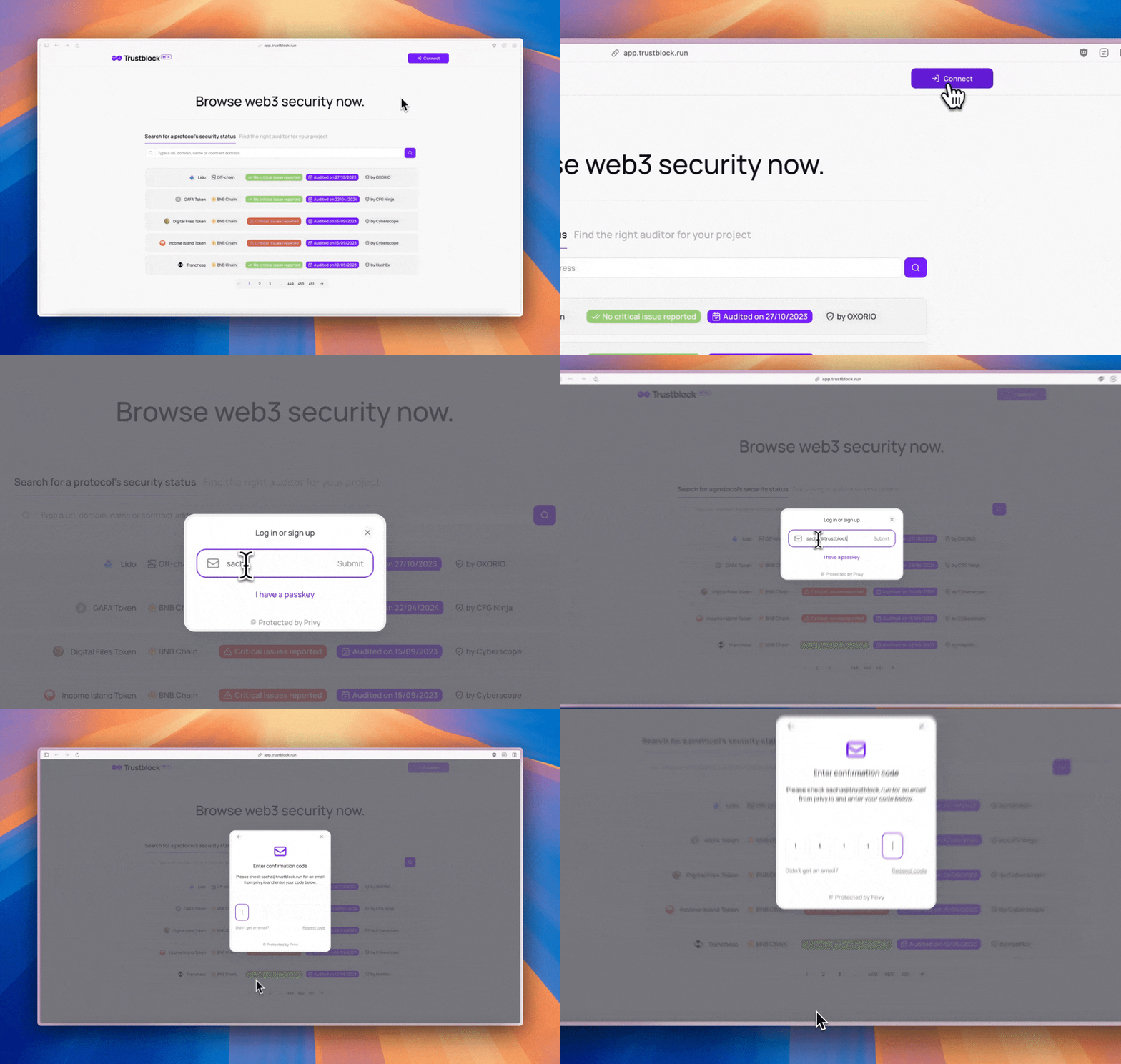
Click on your name at the top right of the screen.
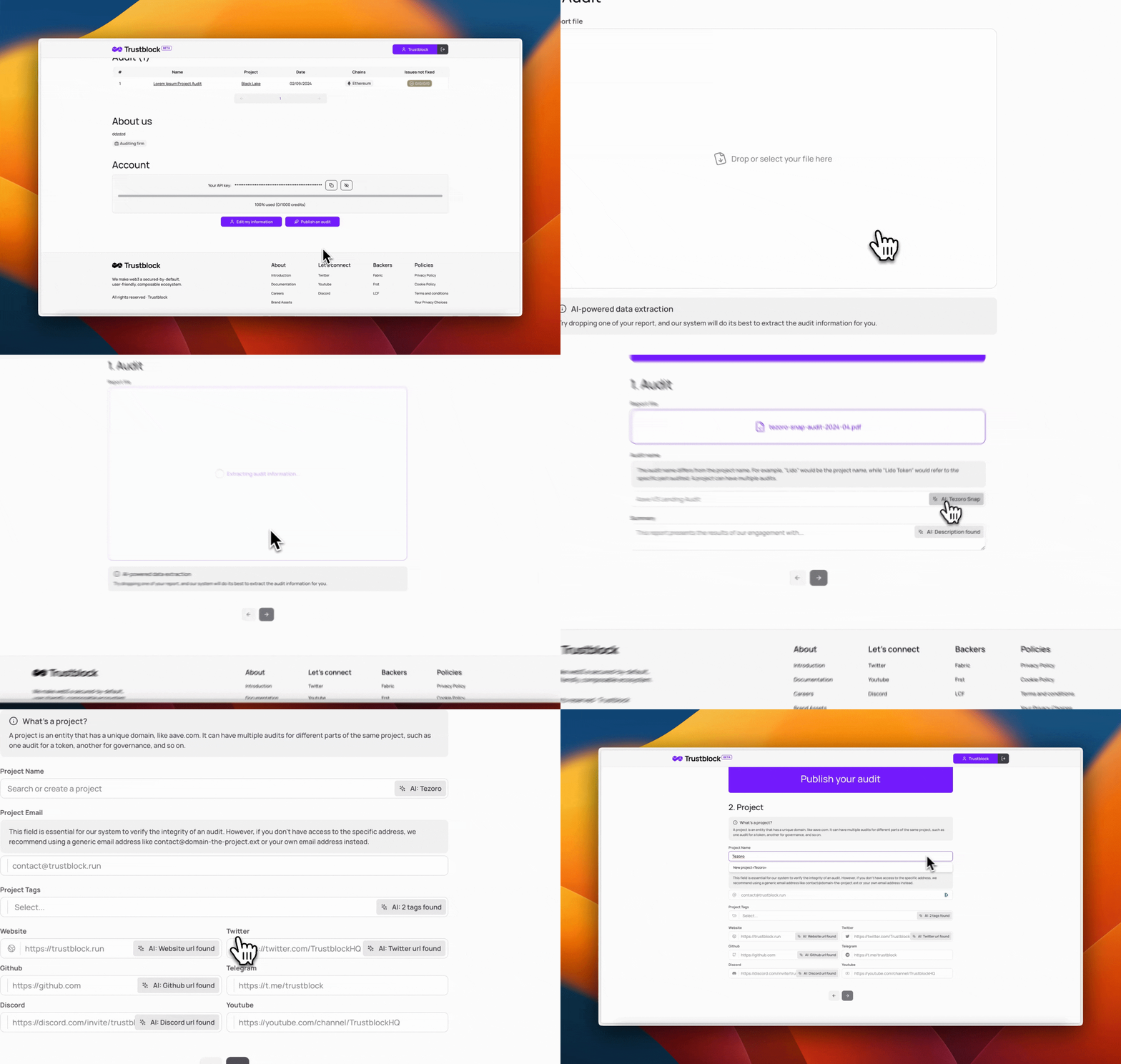
At the bottom of your profile's page, you'll see a "Publish an audit" button redirecting you to the audit publication form once you click on it.
Follow the instructions on the form and submit it.
To publish an audit through our API, you must structure your data object in a specific way involving four parts: audit, issues, contracts, and project.
```typescript theme={null}
// The full data structure of an audit
type FullAudit = {
...auditObject,
issues: issueObject[],
contracts: contractObject[],
project: projectObject
}
```
```typescript theme={null}
// The audit data structure
type AuditData = {
// The audit data is at the first level of the full data object.
name: string, // The name of the audit
description: string, // The description of the audit
reportType: 'file' | 'web', // The type of the report
reportFileCid?: string, // The cid of the IPFS hosted report file
reportUrl?: string, // The URL of the report
conductedAt: number, // The date of the audit in seconds
}
```
The name and description expected here are not supposed to be the ones of the project audit. Still, the audit itself, e.g., If you audited the liquidity locker of a project named TokenA, the name of the audit would be Liquidity Locker.
To obtain a valid `reportFileCid`, you will have to perform an upload on our IPFS provider, Pinata.
In order to upload a file successfully, you will first have to fetch the necessary authorization to do so by calling our dedicated route.
Once you have retrieved your authorization response from the previous request, you must upload the file effectively.
```typescript theme={null}
const uploadAuthResponse = // Request to the above route
// Get the response's data from the authorization route
const uploadAuth = uploadAuthResponse.data;
// Create a form data to send the file over to Pinata
const formData = new FormData();
formData.append('file', file);
formData.append('network', 'public');
// Perform a POST request on the URL sent by the authorization route
const uploadResponse = await axios.post<{ cid: string }>(uploadAuth.url, formData, {
maxBodyLength: Infinity,
headers: {
'Content-Type': `multipart/form-data;`,
}
});
// Here you get the reportFileCid needed by the publish audit route.
const reportFileCid = uploadResponse.data.cid;
```
If you want to publish an audit with a web based report, you will have to submit a valid URL through the `reportUrl` field.
Every issues have two attributes: status (`IssueStatus`) & severity (`IssueSeverity`).
An issue status can either be `fixed` or `not_fixed`.
An issue severity can either be `low`, `medium`, `high` or `critical`.
We know all auditors have different values for these fields; our goal was to simplify so that everyone can adapt their own system to ours.
The most important kind of issues are the `not_fixed` `critical` ones.
We are always welcoming suggestions, so don't hesitate to contact us!
```typescript theme={null}
// The issues data structure
type Issue = {
name: string, // The name of the issue
description: string, // The description of the issue
status: IssueStatus, // The status of the issue
severity: IssueSeverity // The severity of the issue
}
```
> All your issues must be stored inside a list passed to the main request body.
Every contract has a type (`ContractType`) field, which can either be: `onChain`, `offChainPublic` or `offChainPrivate`.
Depending on the type, the contract must have different fields.
Additionally, to the type field, two other fields are required to submit an on-chain contract: `address` & `chain`.
`chain` can either be [one of the supported chains](/technical/supported-chains).
```typescript theme={null}
// The on-chain contract data structure
type OnChainContract = {
type: 'onChain', // The type of the contract
chain: supported_chains, // The chain of the contract
address: 'string' // The address of the contract
}
```
A public repository contract needs three fields: `repositoryUrl`, `repositoryCommitHash` & `repositoryFilePath`.
```typescript theme={null}
type OffChainPublicContract = {
type: 'offChainPublic', // The type of the contract
repositoryUrl: 'string', // The repository url of the contract
repositoryCommitHash: 'string', // The repository commit hash of the contract
repositoryFilePath: 'string' // The repository file path of the contract
}
```
A private repository contract needs one field: `name`.
```typescript theme={null}
type OffChainPrivateContract = {
type: 'offChainPrivate', // The type of the contract
name: 'string' // The name of the contract
}
```
Our system will automatically check if the audit's project already exists in our database by relying on links.website.
```typescript theme={null}
type Project = {
name: string, // The name of the project
description: string, // The description of the project
links: {
website: string, // The website URL of the project
twitter: string, // The twitter URL of the project (optional)
discord: string, // The discord URL of the project (optional)
telegram: string, // The telegram URL of the project (optional)
github: string, // The discord URL of the project (optional)
youtube: string, // The telegram URL of the project (optional)
linkedIn: string, // The discord URL of the project (optional)
},
tags: ['analytics', 'collectibles', 'finance', 'gaming', 'security', 'social', 'wallet', 'other'], // Pass as many values as relevant
chains: supported_chains[], // Pass as many values as relevant
}
```
`chain` can either be [one of the supported chains](/technical/supported-chains).
To make sure your request never fails, pass all the data needed to create a project, including `links`, `name`, `description`, `chains` and `tags`.
```typescript theme={null}
type FullAudit = {
name: string, // The name of the audit
description: string, // The description of the audit
reportType: 'file' | 'web', // The type of the report
reportFileCid?: string, // The cid of the IPFS hosted report file
reportUrl?: string, // The URL of the report
conductedAt: number, // The date of the audit in seconds
issues: [
{
name: string, // The name of the issue
description: string, // The description of the issue
status: IssueStatus, // The status of the issue
severity: IssueSeverity // The severity of the issue
},
...
],
contracts: [
{
type: 'offChainPublic', // The type of the contract
repositoryUrl: string, // The URL of the repository, e.g. https://github.com/Uniswap/v3-core
repositoryCommitHash: string, // The commit hash of the repository, e.g. 4024732be626f4b4299a4314150d5c5471d59ed9
repositoryFilePath: string, // The path to the audited contract, e.g. contracts/NoDelegateCall.sol
} | {
type: 'onChain', // The type of the contract
chain: supported_chains, // The chain of the contract
address: 'string' // The address of the contract
} | {
type: 'offChainPrivate', // The type of the contract
name: 'string' // The name of the contract ; usually the contract file name
},
...
],
project: {
slug: string, // The slug of the project
domain: string // The domain of the project
//Only one of the above fields is required.
} | {
name: string, // The name of the project
description: string, // The description of the project
links: {
website: string, // The website URL of the project
twitter: string, // The twitter URL of the project (optional)
discord: string, // The discord URL of the project (optional)
telegram: string, // The telegram URL of the project (optional)
github: string, // The discord URL of the project (optional)
youtube: string, // The telegram URL of the project (optional)
linkedIn: string, // The discord URL of the project (optional)
},
tags: ['analytics', 'collectibles', 'finance', 'gaming', 'security', 'social', 'wallet', 'other'], // Pass as many values as relevant
chains: supported_chains[], // Pass as many values as relevant
}
}
```
Once you have structured your data object, you can send the request to our API.
***
## And then what?
That's it!
Your audit is published and now accessible through our system.
We refresh metrics on Trustblock every day at a fixed time, and as such, your profile should be updated pretty soon after publishing your audits with the newest metrics.
Learn how to integrate Trustblock's metrics widget on your website.
The audit you publish will now be available from labels and API. Check the links below for more information.
Learn how to integrate Trustblock's labels on your website.
Learn how to integrate Trustblock's security data API on your website.